
$1,560.00
1000 in stock
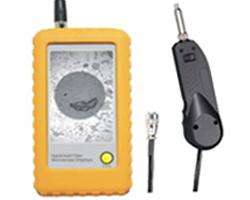
Fibre Optic Handheld Video Microscope provides a portable and convenient way to inspect fibre optic terminations, including connectors located in difficult-to-access areas.
Unlike inspection methods that require direct visual access to the connector, the handheld video microscope helps technicians inspect fibre connections positioned behind patch panels or inside hardware devices.
Therefore, technicians can inspect installed fibre connectors without first accessing the rear of a patch panel or unnecessarily disassembling equipment.
For fibre installers, network technicians and maintenance teams, this can significantly simplify connector inspection and troubleshooting.
Connector cleanliness plays a critical role in fibre optic network performance.
Dust, contamination and debris on a fibre connector end face can interfere with optical transmission. Therefore, inspection should form part of a professional fibre cleaning and connection process.
A fibre inspection microscope allows technicians to examine the connector end face before making or troubleshooting a connection.
This becomes particularly important when working with:
One of the main advantages of the fibreSales Handheld Video Microscope is its ability to assist with connectors in locations that technicians cannot easily inspect using a conventional direct-view microscope.
For example, a fibre connector may sit on the backside of an installed patch panel.
Alternatively, the connector may sit inside a piece of network hardware where direct access remains limited.
Without a suitable inspection tool, a technician may need to:
The handheld video microscope provides a much more practical approach.
Technicians can inspect suitable connectors without unnecessarily disturbing the surrounding installation.
Patch panels can create challenging inspection conditions.
Once installers mount and populate a panel inside a rack or cabinet, accessing the rear connections may become difficult.
Other equipment, cable management and rack positioning can further restrict access.
The handheld fibre microscope helps technicians inspect these hard-to-reach fibre terminations while minimising disruption to the installed network.
This makes it particularly useful for:
Fibre connectors do not always sit on easily accessible patch panels.
Many network and telecommunications devices contain optical interfaces where the connector or termination can prove difficult to inspect directly.
The fibreSales Handheld Video Microscope provides technicians with a practical way to examine suitable fibre terminations within hardware devices without automatically resorting to equipment disassembly.
This can save valuable time during maintenance and troubleshooting.
When technicians investigate a fibre link problem, connector inspection provides a logical early troubleshooting step.
Rather than immediately assuming the fibre cable or active equipment has failed, technicians can inspect accessible connector end faces for visible contamination or other conditions that may require attention.
A portable video microscope can therefore support a more structured workflow:
Inspect → Clean if required → Re-inspect → Connect → Test
This approach helps technicians avoid unnecessary disturbance to fibre infrastructure while ensuring connector condition receives appropriate attention.
Inspection alone does not clean a fibre connector.
Likewise, technicians should not assume a connector is clean simply because they have cleaned it.
Instead, professional fibre maintenance combines inspection and cleaning.
A practical workflow is:
fibreSales supplies professional Fibre Cleaning Products to support fibre connector preparation and maintenance.
Fibre technicians often work across multiple racks, communications rooms and project locations.
Therefore, portable inspection equipment can make day-to-day troubleshooting easier.
The handheld design allows technicians to carry the video microscope as part of their fibre installation and testing equipment.
Typical users include:
The fibreSales Handheld Fibre Optic Video Microscope suits a broad range of fibre inspection tasks.
Typical applications include:
Each fibre testing tool performs a different function.
| Equipment | Primary Function |
|---|---|
| Handheld Video Microscope | Fibre connector end-face inspection |
| Visual Fault Locator | Visual continuity and physical fault identification |
| OTDR | Fibre event, distance and fault analysis |
| Optical Loss Test Set | End-to-end optical loss measurement |
Therefore, technicians should select the tool according to the problem they need to investigate.
A microscope examines the connector condition, while an OTDR investigates events along the optical link.
For comprehensive fibre troubleshooting, technicians may use several tools together.
Explore fibreSales OTDRs for more advanced optical fibre testing.
Direct-view inspection can become impractical when connectors sit in confined or inaccessible locations.
A handheld video inspection system gives technicians greater flexibility.
Key benefits include:
For busy data centres and communications rooms, these advantages can save considerable time during routine inspection and fault investigation.
Choose a handheld video microscope when connector access makes conventional direct inspection difficult.
This becomes particularly valuable when fibre connectors sit behind installed patch panels, within densely populated racks or inside compatible hardware devices.
For fibre faults occurring elsewhere along the cable, use the appropriate optical testing equipment rather than relying on connector inspection alone.
fibreSales supplies fibre optic testing, cleaning, installation and troubleshooting products for Australian telecommunications and data networks.
Alongside fibre inspection equipment, technicians can source:
Combining the correct inspection, cleaning and testing equipment helps technicians approach fibre maintenance systematically.
A Handheld Fibre Optic Video Microscope is a portable inspection tool designed to help technicians visually examine fibre optic connector terminations.
The microscope allows technicians to inspect fibre optic connector terminations, including connectors located in difficult-to-access positions.
Yes. Inspecting difficult-to-reach connectors behind patch panels is one of the key applications of this product.
The microscope can reduce the need to physically access the backside of a patch panel before inspecting suitable fibre connections.
Yes. The product is designed to assist with inspecting difficult-to-access connectors, including those positioned inside suitable hardware devices.
The microscope can allow inspection without first disassembling suitable hardware, depending on the connector location and equipment design.
No. A microscope visually inspects the fibre connector. Use appropriate optical test equipment when you need to measure link loss.
No. A microscope inspects connector end faces, whereas an OTDR analyses optical events and faults along a fibre link.
Inspection can help identify whether a connector requires cleaning. After cleaning, technicians should inspect it again before connection where the applicable procedure requires it.
Yes. fibreSales supplies a range of Fibre Cleaning Products for fibre installation and maintenance.
Make difficult fibre connector inspection easier with the fibreSales Handheld Fibre Optic Video Microscope.
Its portable video inspection design allows technicians to examine fibre terminations in locations that can prove difficult to reach, including connectors installed behind patch panels and inside hardware devices.
For technicians working in data centres, telecommunications networks and fibre installations, it provides a practical way to inspect connectors while reducing unnecessary equipment access and disassembly.
The fibreSales Handheld Fibre Optic Video Microscope provides a convenient solution for inspecting fibre connectors where direct physical access proves difficult.
By allowing technicians to inspect terminations behind patch panels and inside suitable hardware, the microscope can simplify fibre maintenance and reduce the time required to access installed equipment.
Combined with the correct fibre cleaning and optical testing equipment, it becomes a valuable part of a professional fibre technician’s troubleshooting toolkit.
For more fibre optic solutions, technical resources, and installation products, visit www.fibresales.com.au.