
$30.00
1000 in stock
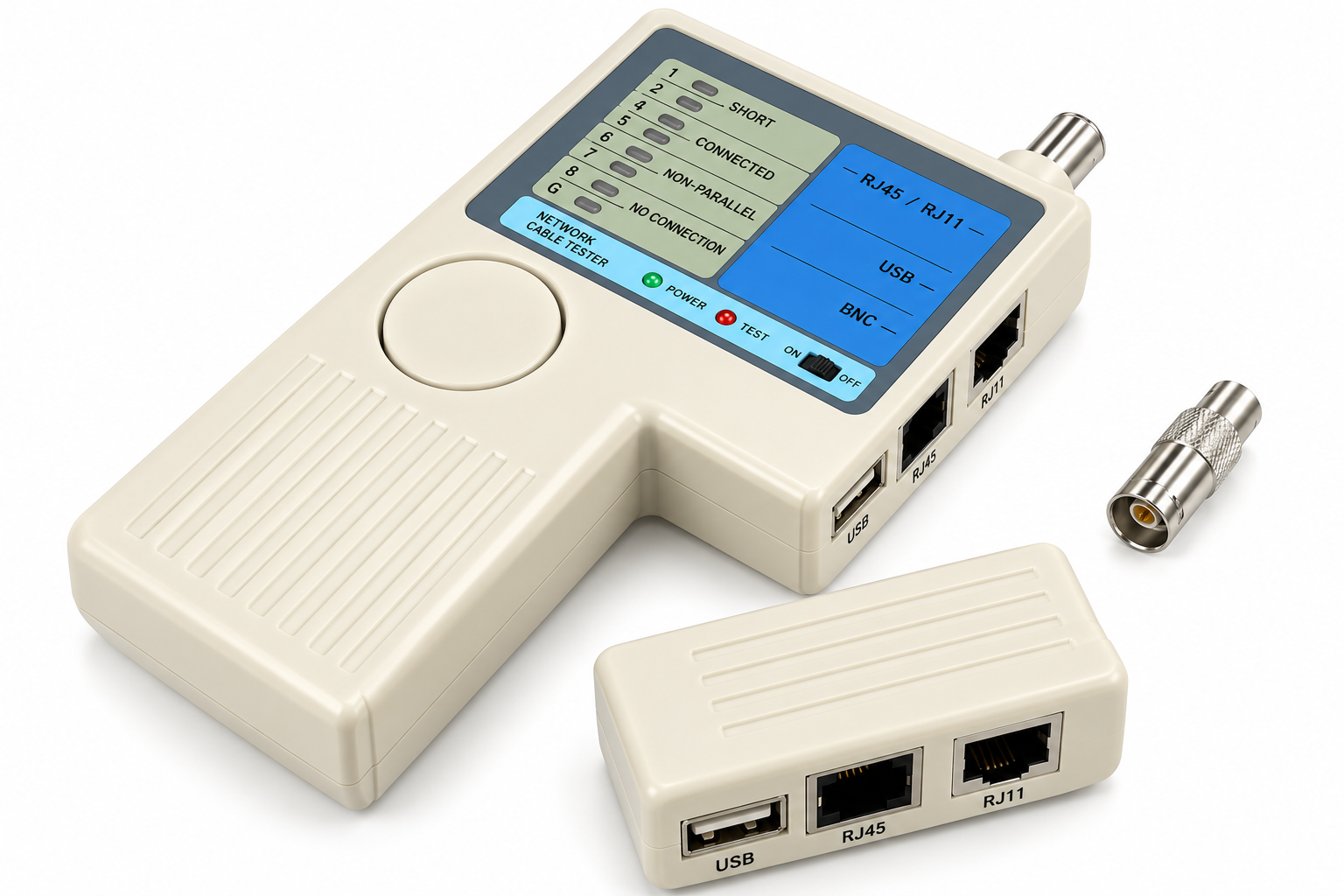
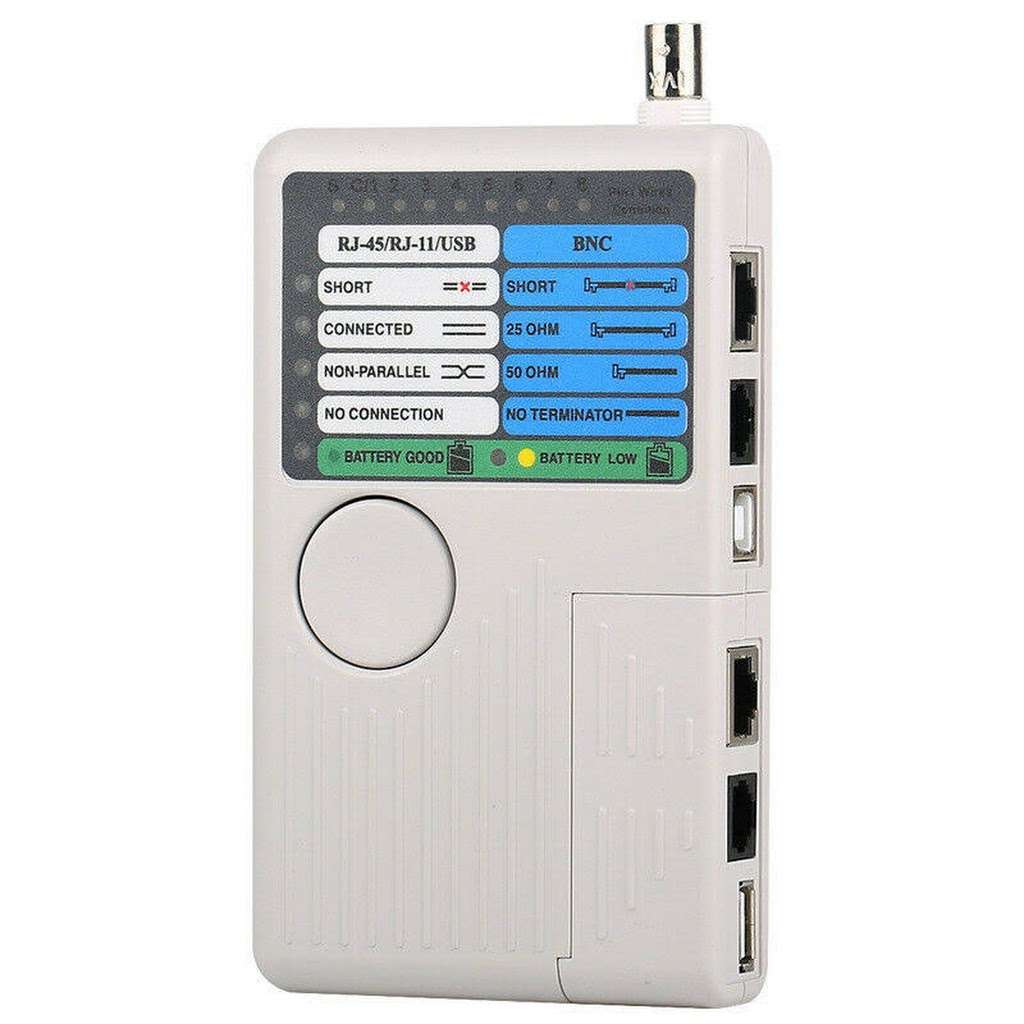
The fibreSales 4-in-1 LAN Network Cable Tester provides a versatile handheld solution for testing RJ45, RJ11, USB and BNC cables. Designed for network installation, telecommunications, maintenance and troubleshooting, the tester checks installed wiring as well as individual patch cables.
It supports both UTP and STP LAN cables terminated with RJ45 male connectors and can identify common wiring problems including no connection, short circuits, open circuits and crossover wiring.
Remote testing, audible indication, LED fault identification and simple one-button operation make the tester a practical addition to a technician’s toolkit.
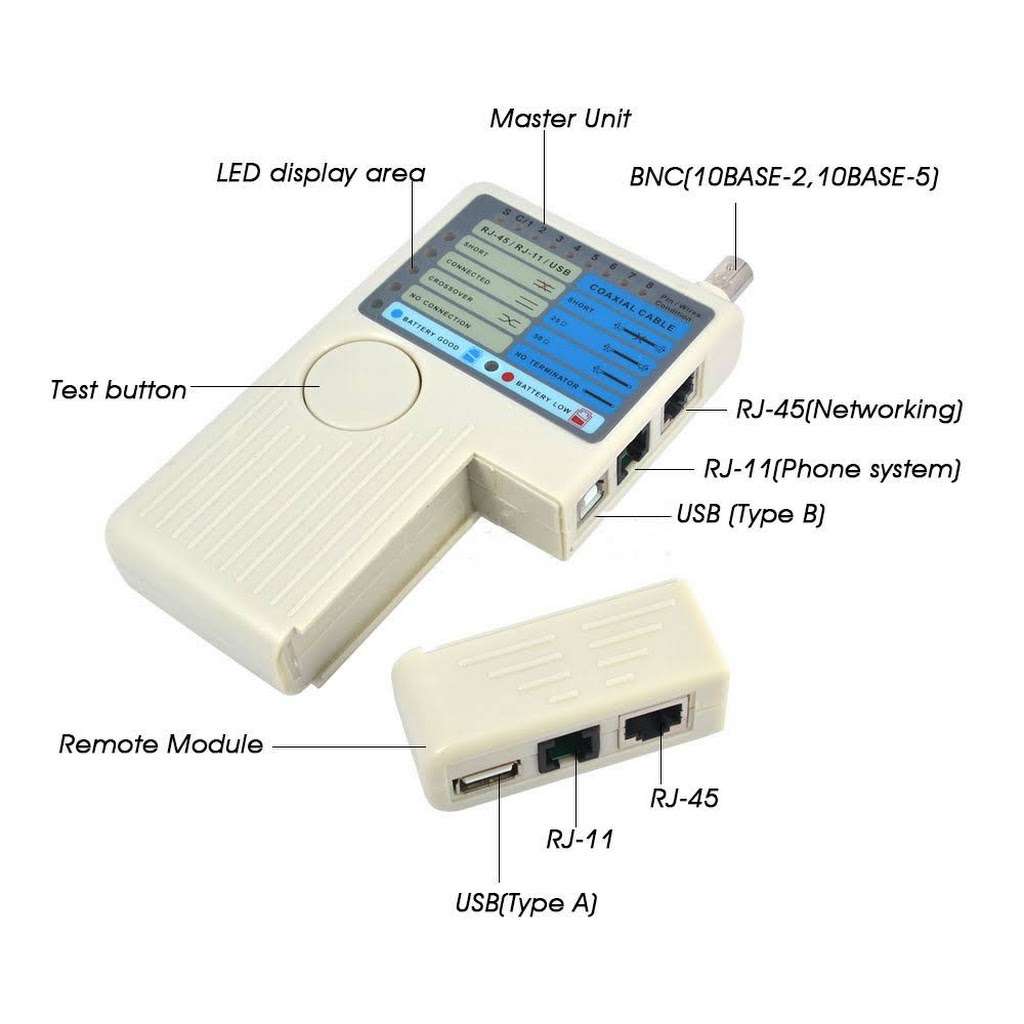
Rather than carrying separate basic testers for several common cable formats, this unit combines four test interfaces in one handheld instrument.
The tester supports UTP and STP LAN cables terminated with RJ45 male connectors.
It can check installed network wiring as well as patch cables and provides LED indications for wire and pin connections.
RJ11 cables fitted with male connectors can also be tested.
The supported RJ11 configuration accommodates 2 to 6 installed conductors, making the unit useful for compatible telecommunications cabling as well as LAN work.
USB testing supports cables with a Type A flat plug on one end and a Type B square plug on the other.
The tester can also check the shield in USB cables.
BNC cables fitted with male connectors can be tested for wiring faults.
The unit also provides 25/50 Ohm BNC terminator indications.
The 4-in-1 Network Cable Tester helps identify several common cabling problems.
It indicates:
LEDs show wire and pin connections as well as detected faults, giving technicians a straightforward visual indication of test results.
An integrated beeper also provides audible annunciation.
Choose the fibreSales 4-in-1 Network Cable Tester when you need one portable instrument for basic RJ45, RJ11, USB and BNC cable testing and fault identification.
It is particularly useful for installation and troubleshooting where technicians need to identify basic connection, continuity and wiring faults across several cable formats.
The tester supports both:
This capability makes it suitable for checking compatible LAN cables across a range of structured cabling environments.
For shielded applications, remember that basic wire-map testing differs from formal structured cabling certification. Use appropriate certification equipment whenever a project requires verification against specified cabling performance standards.
The tester provides straight or crossover indications, helping technicians identify the wiring arrangement of compatible network cables.
This function can prove useful when troubleshooting existing cables or checking newly terminated connections.
For more information on Ethernet conductor arrangements, see the fibreSales RJ45 Pinout Guide.
Testing installed wiring can become difficult when the two ends of a cable terminate in different locations.
The supplied remote functionality allows technicians to test from separate points.
This capability can assist when checking cabling between:
For convenient storage, the remote unit fits into the main tester when not in use.
The supplied specification states a 300 ft test distance for RJ45, RJ11 and BNC testing.
That equates to approximately 91 metres.
This range makes the tester useful for checking installed cabling where the two connection points sit some distance apart.
Actual testing should always follow the operating instructions and supported cable configuration.
LEDs provide visual information about connections and faults across the cable conductors and pins.
This straightforward display allows technicians to check cable condition without navigating complex menus.
The tester also incorporates a low-battery LED indicator, helping the user identify when the battery requires replacement.
In addition to visual LED indications, the tester incorporates a beeper for audible annunciation of test results.
Audible feedback can prove particularly useful when working in cabinets or other environments where continuously watching the tester display may be inconvenient.
The tester uses a straightforward one-button test operation.
This approach helps make routine cable checks quick and practical, particularly when technicians need to test multiple cables during installation or maintenance.
Fast-speed testing further supports repetitive cable-checking tasks.
| Specification | Details |
|---|---|
| Product | fibreSales 4-in-1 LAN Network Cable Tester |
| Cable Types Tested | RJ45, RJ11, USB and BNC |
| RJ45 Cable Types | UTP and STP LAN Cable |
| RJ45 Connector | Male |
| RJ45 Wiring Reference | EIA/TIA 568 |
| RJ11 Connector | Male |
| RJ11 Conductors | 2 to 6 Conductors Installed |
| USB Interface | Type A Flat Plug to Type B Square Plug |
| USB Shield Test | Yes |
| BNC Connector | Male |
| Fault Indication | No Connection, Short Circuit, Open Circuit, Crossover |
| Straight/Crossover Indication | Yes |
| Remote Testing | Yes |
| Remote Test Points | Up to 2 Remote Points |
| Audible Indicator | Beeper |
| Visual Indication | LEDs |
| BNC Terminator Indication | 25/50 Ohm |
| Stated Test Distance | 300 ft / approx. 91 m – RJ45, RJ11 and BNC |
| Low Battery Indicator | LED |
| Operation | One-Button Test |
| Power | 1 × 9V 6F22 DC Alkaline Battery |
| Battery Included | No |
| Dimensions | 144 × 86 × 25.5 mm |
| Weight | 168 g |
At just 144 × 86 × 25.5 mm, the tester provides multiple cable-testing functions in a compact handheld format.
Its 168 g weight also makes it practical for carrying in a technician’s field toolkit.
The integrated remote storage further helps keep the main tester and remote component together between jobs.
The 4-in-1 tester operates from:
1 × 9V 6F22 DC alkaline battery
The battery is not included.
Convenient battery access simplifies replacement, while the low-battery LED provides a visual warning when the battery level drops.
Each package contains:
9V battery not included.
The 4-in-1 Network Cable Tester suits:
After terminating an RJ45 connector, a visual inspection alone cannot confirm every conductor connection.
The tester provides a quick way to check the cable for basic wiring faults before putting it into service.
A typical process involves:
For termination equipment, see the fibreSales Cat6 Crimping Tool.
A cable tester and wire tracker perform different jobs.
| Tool | Primary Purpose |
|---|---|
| 4-in-1 Network Cable Tester | Checks cable connections and identifies supported wiring faults |
| Wire Tracker / Tone Generator | Helps locate and identify a particular cable |
For technicians installing and maintaining existing networks, both tools can provide useful but different diagnostic capabilities.
This product provides practical cable and wiring checks. However, it does not replace a professional structured cabling certification tester.
The 4-in-1 tester can identify supported connection and wiring faults.
Certification equipment performs more advanced measurements to verify whether an installed cabling link meets specified transmission-performance requirements.
Therefore, choose the test equipment according to the level of verification the project requires.
Basic wiring tests can identify connection faults, but they do not certify the transmission performance of a structured cabling link.
Always test newly terminated cables rather than relying only on visual inspection.
Check the intended wiring configuration before deciding whether a crossover indication represents a fault.
Select the correct RJ45, RJ11, USB or BNC connection for the cable under test.
Replace the 9V battery when the low-battery indicator activates.
Complete your copper network installation and testing toolkit with:
fibreSales supplies network installation, termination and testing products for Australian telecommunications and data infrastructure.
The 4-in-1 LAN Network Cable Tester combines four useful cable-testing interfaces in one compact handheld instrument.
Support for RJ45, RJ11, USB and BNC cables gives technicians flexibility across different installation and maintenance tasks. Meanwhile, remote testing, LED indications, audible results and simple one-button operation make routine cable checks straightforward.
It tests RJ45, RJ11, USB and BNC cables.
It can test compatible RJ45 LAN cabling for the supported wiring and connection faults. It does not provide Cat6 performance certification.
Yes. The tester supports both UTP and STP LAN cables.
It indicates no connections, short circuits, opens and crossover wiring.
Yes. The remote testing arrangement allows technicians to check installed wiring as well as patch cables.
The supplied specifications state a 300 ft test distance for RJ45, RJ11 and BNC, which is approximately 91 metres.
Yes. It supports USB cables with a Type A flat plug at one end and Type B square plug at the other.
Yes. USB shield testing forms part of the supplied functionality.
Yes. The tester supports BNC cables with male connectors and provides 25/50 Ohm terminator indications.
Yes. The tester provides straight or crossover indications.
Yes. A built-in beeper provides audible annunciation of test results.
It uses one 9V 6F22 DC alkaline battery.
No. The 9V battery is not included.
The tester measures 144 × 86 × 25.5 mm.
The unit weighs 168 g.
Test multiple cable formats with one portable instrument using the fibreSales 4-in-1 LAN Network Cable Tester.
Support for RJ45, RJ11, USB and BNC makes it a versatile choice for network installers and technicians, while fault indications help identify opens, shorts, connection problems and crossover wiring.
Remote testing, audible and LED indications, one-button operation and a compact handheld design make the unit particularly practical for everyday field use.
The fibreSales 4-in-1 LAN Network Cable Tester combines RJ45, RJ11, USB and BNC testing within one portable instrument.
It supports UTP and STP LAN cables, installed wiring and patch cables while providing clear indications for common connection and wiring faults. In addition, remote testing makes it practical for cables with endpoints in separate locations.
With simple one-button operation, LED and audible indications, a compact 144 × 86 × 25.5 mm body and a weight of only 168 g, it provides a versatile addition to a network technician’s testing toolkit.
For more fibre optic solutions, technical resources, and installation products, visit www.fibresales.com.au.
| File | File size |
|---|---|
| 4-in-1 LAN Network Tester Brochure | 807 KB |
| File | File size |
|---|---|
| 4-in-1 LAN Network Tester Brochure | 807 KB |