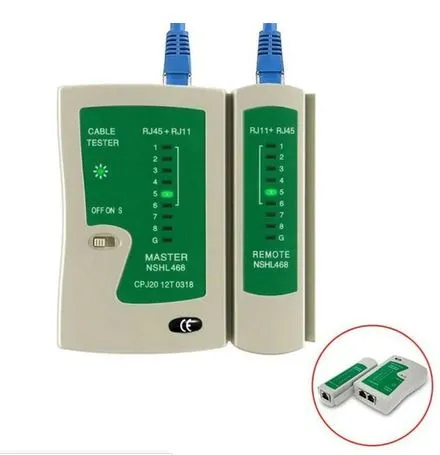
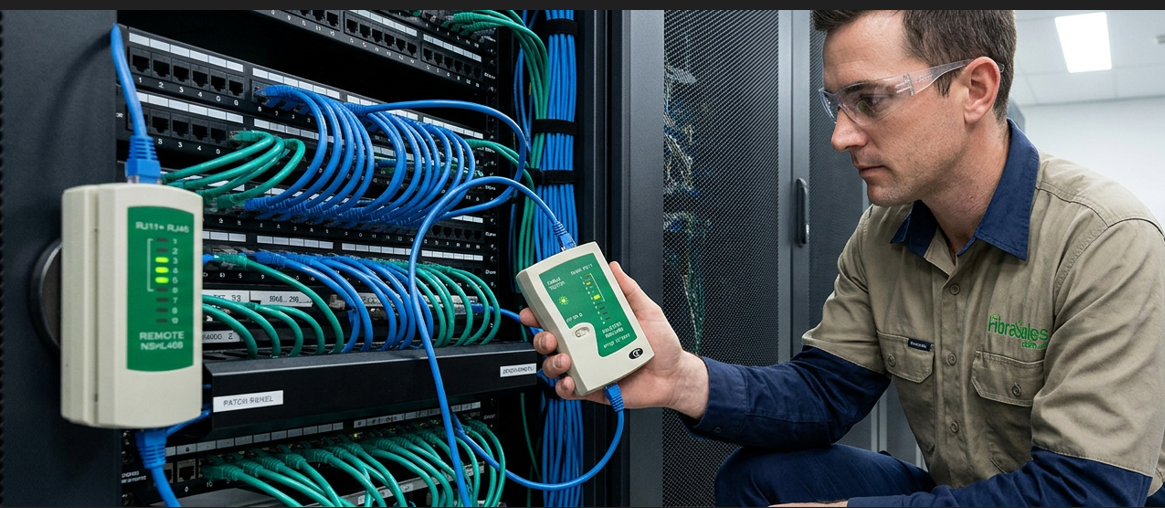
The NSHL 468 tester is a versatile, multi-purpose cable tester designed for testing local area network (LAN) and telephone cables. It ensures network stability by detecting faults, miswiring, and connectivity issues in Ethernet and phone cables.
Whether you’re a network installer, IT technician, or a home user troubleshooting network issues, this tool provides an efficient and cost-effective way to verify cable integrity.
NSHL 468 MultiPurpose Tester
Supported Cable Types
The NS 468 cable tester is compatible with multiple cable types, including:
RJ45 Connection – Used for Ethernet cables (Cat5, Cat5e, Cat6).
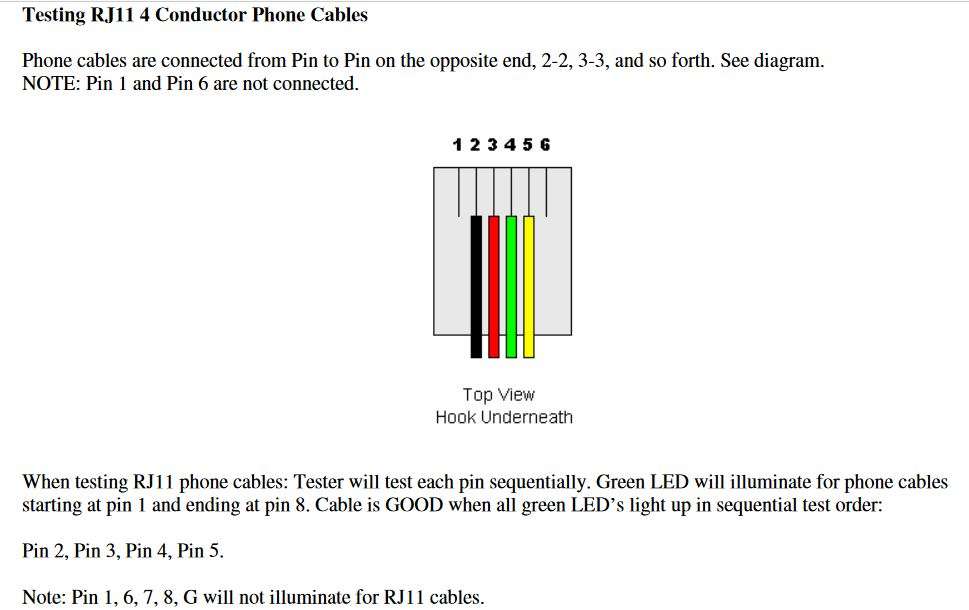
RJ11 Connection – Used for 4-conductor telephone cables.
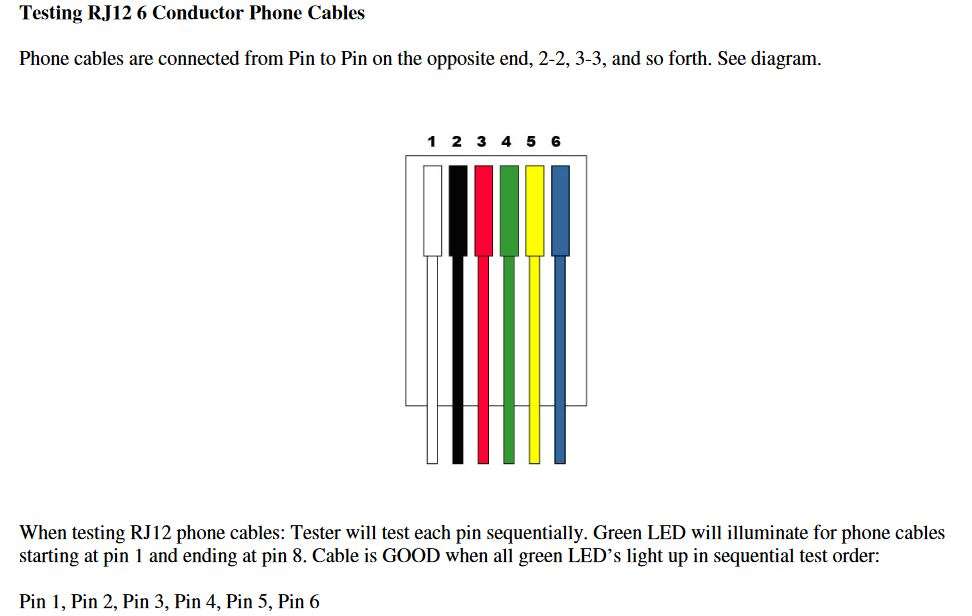
RJ12 Connection – Used for 6-conductor telephone cables.
This flexibility makes it an essential tool for anyone working with both network and telecommunication systems.
NSHL 468 MultiPurpose Tester Key Features
Master and Remote Units
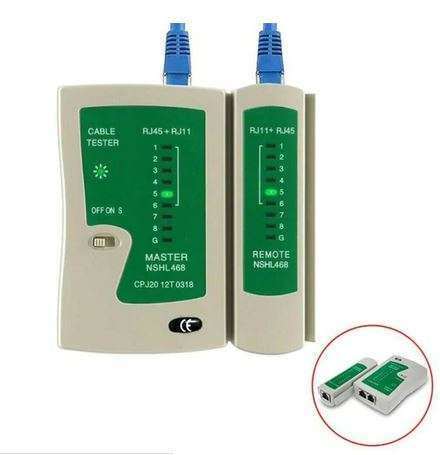
The tester consists of two units: the Master Unit and the Remote Unit. The Master Unit connects to one end of the cable, while the Remote Unit connects to the other, allowing tests to be conducted even on long cable runs in different locations.
LED Status Indicators
The NS 468 tester checks each electrical connection in a cable and provides visual feedback using green LED lights.
For RJ45 cables: LEDs 1 through G should light up sequentially on both the Master and Remote units, confirming a properly wired connection.
For RJ11 cables: LEDs 2, 3, and 4 should light up on the Remote Unit.
For RJ12 cables: Pins 7, 8, and G will not illuminate.
If an LED does not light up or appears out of order, it indicates a wiring issue, such as an open circuit, short circuit, or crossed wires.
Two Testing Speeds
The tester offers two test modes:
FAST mode – Provides quick results by testing the cable in rapid sequence.
SLOW mode (S position) – Slows down the test, making it easier to diagnose faults in more detail.
Battery Operated
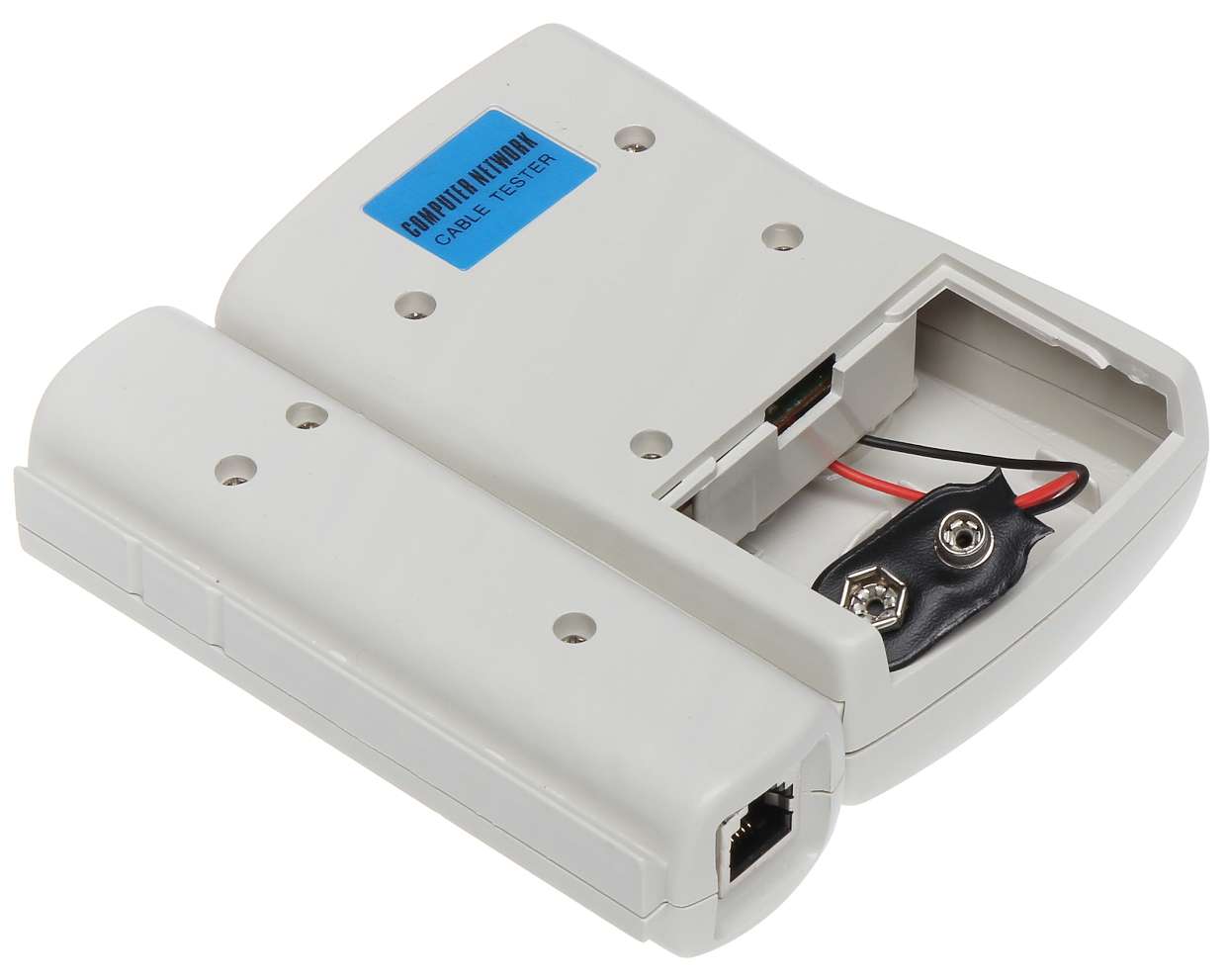
The tester runs on a 9V battery, located at the back of the Master Unit. A fresh battery allows testing for cables up to 300 meters in length.
Portable and Durable Design
Compact and lightweight, making it easy to carry in a toolbag.
Simple operation with no complex setup required.
Durable construction ensures long-term use in professional or home environments.
So how does it work?
It is a battery operated device using a 9V battery located in the back of the Master Unit.
It can test up to 300 metres with a new battery installed.
NSHL 468 Multi-Purpose Tester
You simply connect your cable “either a RJ45 or RJ11/12” into the appropriate port on both the master and remote, turn the unit on for FAST test or into the “S” Position for Slow automatic test.
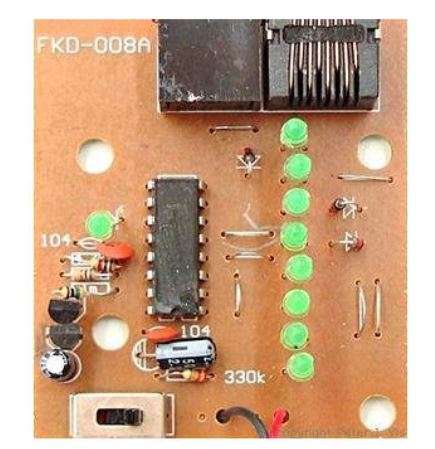
The tester has a sequence of 9 lights both on the Master and Remote.
When a LED fails to light up you know that there is a fault with the connection at that point.
The NS 468 cable tester will test each pin sequentially.
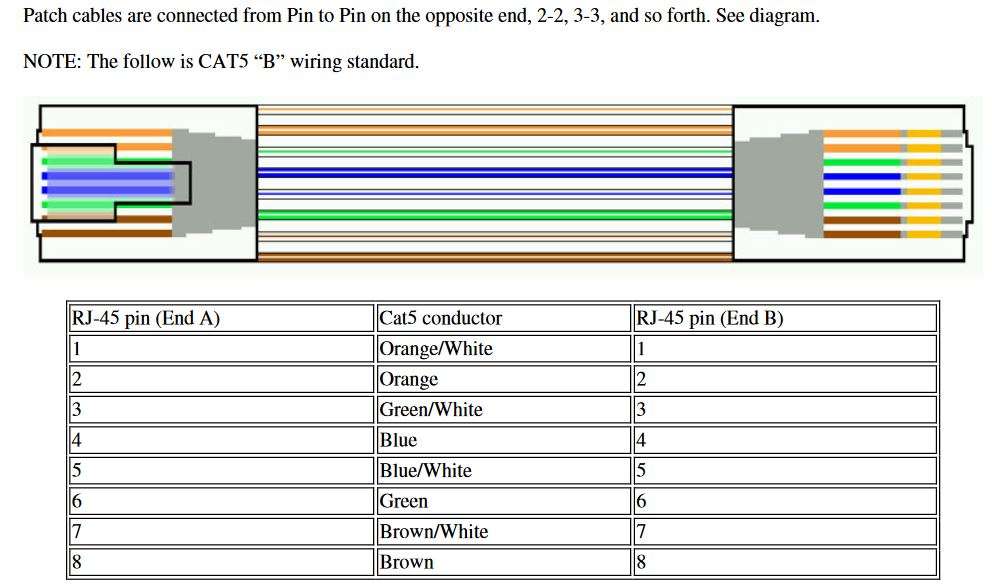
PIN 1 to PIN 8 Green LED lights will all illuminate if the cable is good.
Note that PIN G will NOT illuminate for RJ45 cables.
If the LED lights up in the wrong order this could indicate a crossed connection.
Note: Pin 7,8, G will not illuminate for RJ12 cables.
If the LED light up in the wrong order this could indicate a crossed connection.
NSHL 468 Multi-Purpose Tester
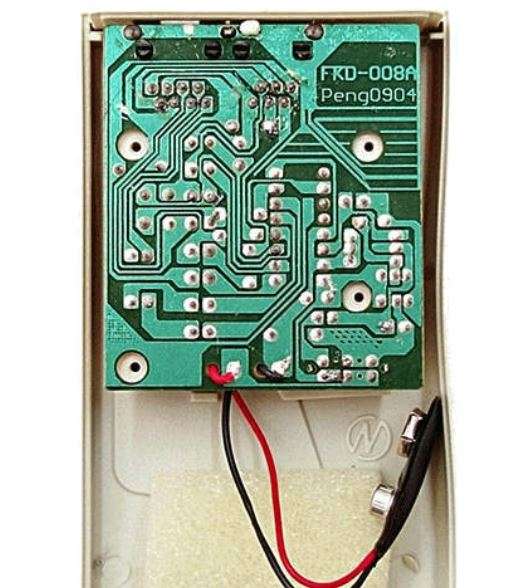
It has a basic PCB (printed circuit board) layout.
NSHL 468 Multi-Purpose Tester
With LED’s, chips and transistors that make it all work.
Introduction to the NS 468 Cable Tester
The NSHL 468 is a versatile, multi-purpose cable tester designed for testing local area network (LAN) and telephone cables. It ensures network stability by detecting faults, miswiring, and connectivity issues in Ethernet and phone cables.
Whether you’re a network installer, IT technician, or a home user troubleshooting network issues, this tool provides an efficient and cost-effective way to verify cable integrity.
The NS 468 cable tester is compatible with multiple cable types, including:
RJ45 Connection – Used for Ethernet cables (Cat5, Cat5e, Cat6).
RJ11 Connection – Used for 4-conductor telephone cables.
RJ12 Connection – Used for 6-conductor telephone cables.
This flexibility makes it an essential tool for anyone working with both network and telecommunication systems.
Key Features
Master and Remote Units
The tester consists of two units: the Master Unit and the Remote Unit. The Master Unit connects to one end of the cable, while the Remote Unit connects to the other, allowing tests to be conducted even on long cable runs in different locations.
LED Status Indicators
The NS 468 tester checks each electrical connection in a cable and provides visual feedback using green LED lights.
For RJ45 cables: LEDs 1 through G should light up sequentially on both the Master and Remote units, confirming a properly wired connection.
For RJ11 cables: LEDs 2, 3, and 4 should light up on the Remote Unit.
For RJ12 cables: Pins 7, 8, and G will not illuminate.
If an LED does not light up or appears out of order, it indicates a wiring issue, such as an open circuit, short circuit, or crossed wires.
Two Testing Speeds
The tester offers two test modes:
FAST mode – Provides quick results by testing the cable in rapid sequence.
SLOW mode (S position) – Slows down the test, making it easier to diagnose faults in more detail.
Battery Operated
The tester runs on a 9V battery, located at the back of the Master Unit. A fresh battery allows testing for cables up to 300 meters in length.
Portable and Durable Design
Compact and lightweight, making it easy to carry in a toolbag.
Simple operation with no complex setup required.
Durable construction ensures long-term use in professional or home environments.
How Does the NS 468 Cable Tester Work?
Insert the Cable – Connect one end of the Ethernet or phone cable to the Master Unit and the other end to the Remote Unit.
Power On the Tester – Turn the unit on and select either FAST or SLOW mode.
Observe LED Sequences – Watch the LEDs light up in sequence to check for proper wiring.
Identify Faults –
If all LEDs light up correctly, the cable is properly wired.
If an LED does not light up, the cable has an open circuit at that pin.
If LEDs illuminate in the wrong order, the cable has a crossed or miswired connection.
This straightforward testing process ensures quick and accurate troubleshooting of network and phone cables.
Common Cable Issues Detected
Open Circuit – A broken wire prevents the signal from reaching its destination.
Short Circuit – Two or more wires touch each other, causing a signal disruption.
Crossed Wires – Incorrect wiring causes LEDs to illuminate out of sequence.
Miswiring – Pins are not connected to the correct locations, causing network failure.
Identifying and fixing these issues helps maintain a strong and reliable network connection.
Why Use the NS 468 Cable Tester?
Ensures Proper Network Connectivity – Helps prevent slow internet speeds, disconnections, and data loss due to faulty cables.
Saves Time and Effort – Quickly identifies wiring issues without the need for complex tools or professional assistance.
Cost-Effective – Affordable solution compared to expensive network diagnostic tools.
Essential for IT Professionals – Ideal for network technicians, electricians, and home users who frequently work with Ethernet and phone cables.
Portable and Easy to Use – No advanced technical knowledge required, making it accessible for beginners and professionals alike.
Introduction to the NSHL 468 MultiPurpose Tester
The NSHL 468 is a versatile, multi-purpose cable tester designed for testing local area network (LAN) and telephone cables. It ensures network stability by detecting faults, miswiring, and connectivity issues in Ethernet and phone cables.
Whether you’re a network installer, IT technician, or a home user troubleshooting network issues, this tool provides an efficient and cost-effective way to verify cable integrity.
The NS 468 cable tester is compatible with multiple cable types, including:
RJ45 Connection – Used for Ethernet cables (Cat5, Cat5e, Cat6).
RJ11 Connection – Used for 4-conductor telephone cables.
RJ12 Connection – Used for 6-conductor telephone cables.
This flexibility makes it an essential tool for anyone working with both network and telecommunication systems.
NSHL 468 MultiPurpose Tester Key Features
Master and Remote Units
The tester consists of two units: the Master Unit and the Remote Unit. The Master Unit connects to one end of the cable, while the Remote Unit connects to the other, allowing tests to be conducted even on long cable runs in different locations.
LED Status Indicators
The NS 468 tester checks each electrical connection in a cable and provides visual feedback using green LED lights.
For RJ45 cables: LEDs 1 through G should light up sequentially on both the Master and Remote units, confirming a properly wired connection.
For RJ11 cables: LEDs 2, 3, and 4 should light up on the Remote Unit.
For RJ12 cables: Pins 7, 8, and G will not illuminate.
If an LED does not light up or appears out of order, it indicates a wiring issue, such as an open circuit, short circuit, or crossed wires.
Two Testing Speeds
The tester offers two test modes:
FAST mode – Provides quick results by testing the cable in rapid sequence.
SLOW mode (S position) – Slows down the test, making it easier to diagnose faults in more detail.
Battery Operated
The tester runs on a 9V battery, located at the back of the Master Unit. A fresh battery allows testing for cables up to 300 meters in length.
Portable and Durable Design
Compact and lightweight, making it easy to carry in a toolbag.
Simple operation with no complex setup required.
Durable construction ensures long-term use in professional or home environments.
How Does the NSHL 468 MultiPurpose Tester Work?
Insert the Cable – Connect one end of the Ethernet or phone cable to the Master Unit and the other end to the Remote Unit.
Power On the Tester – Turn the unit on and select either FAST or SLOW mode.
Observe LED Sequences – Watch the LEDs light up in sequence to check for proper wiring.
Identify Faults –
If all LEDs light up correctly, the cable is properly wired.
If an LED does not light up, the cable has an open circuit at that pin.
If LEDs illuminate in the wrong order, the cable has a crossed or miswired connection.
This straightforward testing process ensures quick and accurate troubleshooting of network and phone cables.
NSHL 468 MultiPurpose Tester Common Cable Issues Detected
Open Circuit – A broken wire prevents the signal from reaching its destination.
Short Circuit – Two or more wires touch each other, causing a signal disruption.
Crossed Wires – Incorrect wiring causes LEDs to illuminate out of sequence.
Miswiring – Pins are not connected to the correct locations, causing network failure.
Identifying and fixing these issues helps maintain a strong and reliable network connection.
Why Use the NSHL 468 MultiPurpose Tester?
Ensures Proper Network Connectivity – Helps prevent slow internet speeds, disconnections, and data loss due to faulty cables.
Saves Time and Effort – Quickly identifies wiring issues without the need for complex tools or professional assistance.
Cost-Effective – Affordable solution compared to expensive network diagnostic tools.
Essential for IT Professionals – Ideal for network technicians, electricians, and home users who frequently work with Ethernet and phone cables.
Portable and Easy to Use – No advanced technical knowledge required, making it accessible for beginners and professionals alike.
NSHL 468 MultiPurpose Tester Conclusion
The NS 468 Cable Tester is a must-have tool for anyone working with network and phone cables. Its dual-unit design, LED indicators, and compatibility with RJ45, RJ11, and RJ12 cables make it an effective and user-friendly choice for troubleshooting connectivity issues.
With its ability to detect open circuits, short circuits, and crossed connections, this affordable yet powerful device ensures network reliability and efficiency. Whether for home or professional use, the NS 468 simplifies cable testing and keeps networks running smoothly.
Related Posts
Best Cat6 Patch Cable for Business | Buying Guide
Business Cat6 cable selection affects far more than whether an Ethernet connection works. In a...