Cat6 vs Fibre: Which Network Cable Should You Choose?

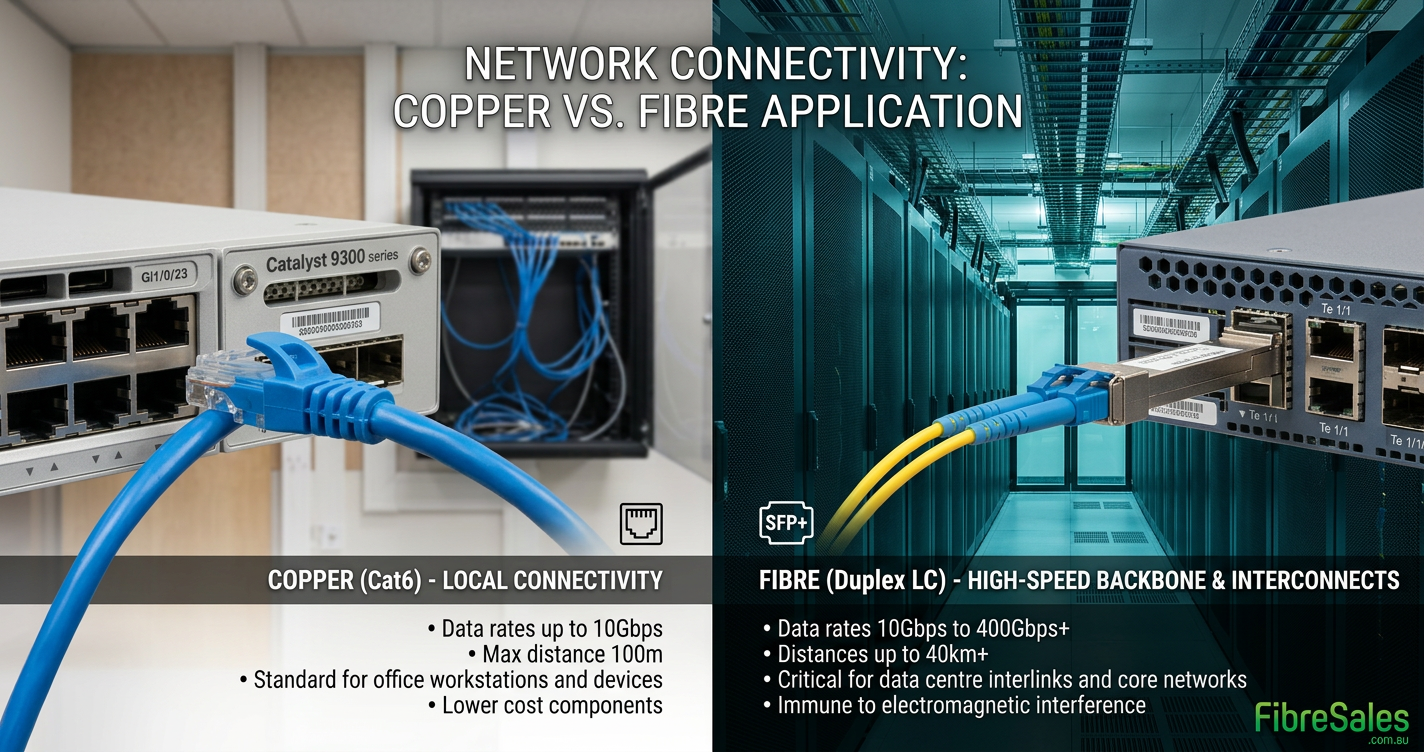
Cat6 vs Fibre comparison showing Cat6 Ethernet cable beside fibre optic patch leads in a business network.

Cat6 vs Fibre: Which Network Cable Should You Choose?

Cat6 vs Fibre is one of the most common comparisons when planning a new network or upgrading existing infrastructure. Rather than deciding which technology is better, the goal is to choose the right solution for your application. Most business networks use both technologies, with Cat6 connecting end-user devices and fibre providing high-speed backbone connectivity.

If you’re planning a new installation or upgrading existing infrastructure, this guide compares Cat6 and fibre across performance, transmission distance, installation, cost and real-world applications so you can make an informed purchasing decision.


Shop Cat6 and Fibre Networking Solutions

For device connections, Cat6 Patch Cables remain the industry standard for connecting computers, switches, wireless access points, IP phones and security cameras.

Where higher bandwidth, longer transmission distances or electrical isolation are required, Bend Insensitive Singlemode Patch Leads provide a reliable solution for enterprise networks, campus environments and data centres.

Many organisations combine both technologies, using fibre for backbone infrastructure while deploying Cat6 throughout offices and workspaces.

related article – Bend Insensitive patch cables with G657.B glass


Cat6 vs Fibre at a Glance

FeatureCat6Fibre Optic
Transmission MediumElectrical signals over copperPulses of light through glass
Standard DistanceUp to 100 metresHundreds of metres to many kilometres
Electromagnetic InterferenceCan be affectedImmune
Network SpeedUp to 10 Gigabit Ethernet (depending on application and distance)Supports significantly higher speeds depending on fibre type and network equipment
Installation CostLowerHigher
Typical ApplicationsDevice connectionsBackbone links, campuses, data centres

Although these differences appear significant, they don’t mean fibre replaces Cat6. Instead, each technology has a specific role within a modern structured cabling system.


When Cat6 Is the Better Choice

Cat6 is the preferred choice whenever network devices are located within the standard 100-metre Ethernet channel and require reliable, affordable connectivity.

Typical applications include:

  • Office workstations
  • Business desktops
  • Wireless access points
  • IP security cameras
  • VoIP telephones
  • Printers
  • Network switches
  • Patch panels

Cat6 also supports Power over Ethernet (PoE), allowing compatible devices to receive both power and data through a single cable. This simplifies installations while reducing infrastructure costs. If you’re selecting cabling for powered network devices, our Best Cat6 Cable for PoE guide explains how to choose the right patch cable for reliable PoE performance.

In most commercial buildings, Cat6 forms the horizontal cabling that connects users and devices to nearby network switches. Fibre is then used to interconnect those switches across longer distances or higher-capacity links.

When Fibre Is the Better Choice

Although Cat6 is ideal for connecting end-user devices, fibre optic cabling becomes the preferred solution whenever greater bandwidth, longer transmission distances or complete immunity to electrical interference is required.

Unlike copper cabling, fibre carries data as pulses of light. Consequently, signal quality remains consistent over much greater distances without suffering the electrical losses associated with copper Ethernet cables.

Fibre is typically the better choice when you need to:

  • Connect buildings across a campus.
  • Link communications rooms on different floors.
  • Build high-speed network backbones.
  • Support large data centres.
  • Connect high-capacity storage or server infrastructure.
  • Install cabling in electrically noisy industrial environments.
  • Future-proof critical network infrastructure.

For these applications, Bend Insensitive Singlemode Patch Leads are commonly used for long-distance enterprise networks, while OM3 and OM4 Multimode Patch Leads are popular for shorter high-speed links within buildings and data centres.


Cat6 vs Fibre Speed Comparison

Both Cat6 and fibre deliver excellent performance; however, they are designed for different network requirements.

Cat6

Cat6 comfortably supports:

  • 1 Gigabit Ethernet
  • 2.5 Gigabit Ethernet
  • 5 Gigabit Ethernet
  • 10 Gigabit Ethernet over shorter channel lengths

This makes Cat6 more than capable of supporting modern office applications including cloud computing, VoIP, Wi-Fi 6/6E access points, security cameras and business networking.

Fibre Optic

Fibre is designed for significantly higher network capacities and can support:

  • 10 Gigabit Ethernet
  • 25 Gigabit Ethernet
  • 40 Gigabit Ethernet
  • 100 Gigabit Ethernet
  • 200G and 400G enterprise deployments

Actual performance depends on the fibre type, transceivers and network equipment selected. Rather than being limited by the cable itself, fibre networks are generally upgraded by replacing optical modules while retaining the existing cabling infrastructure.


Cat6 vs Fibre Distance Comparison

Distance is one of the biggest differences between Cat6 and fibre.

RequirementCat6Fibre
Office workstation✔ ExcellentPossible but unnecessary
Building backboneLimited✔ Ideal
Campus networkingNo✔ Excellent
Data centre interconnectLimited✔ Standard solution
Long-distance communicationsNo✔ Designed for this purpose

Cat6 Ethernet standards limit structured cabling channels to 100 metres. Beyond this distance, signal quality deteriorates and network reliability can suffer.

Fibre optic cabling, by comparison, can span hundreds of metres using multimode fibre or many kilometres using singlemode fibre without requiring intermediate network equipment. This makes fibre the preferred solution whenever network infrastructure extends beyond a single communications room or building.


Cat6 vs Fibre Cost Comparison

The purchase price of a cable is only one part of the total installation cost.

Cat6 generally provides the lowest overall investment because:

  • Patch cables are inexpensive.
  • RJ45 equipment is widely available.
  • Installation is straightforward.
  • No optical transceivers are required.
  • Most business networking equipment already includes Ethernet ports.

Fibre installations typically require additional investment in:

  • Optical transceivers (SFP/SFP+ modules)
  • Fibre patch panels
  • Fibre enclosures
  • Optical testing equipment
  • Specialist installation and termination

However, when long cable runs, higher network speeds or future scalability are required, fibre often delivers the lowest total cost of ownership by reducing the need for future infrastructure upgrades.


Hybrid Networks Deliver the Best Results

For most organisations, the choice is not Cat6 or fibre—it is Cat6 and fibre.

A typical structured cabling design uses:

  • Fibre backbone connections between communications rooms, equipment racks or buildings.
  • Cat6 horizontal cabling from network switches to individual devices.
  • Fibre uplinks connecting high-capacity switches.
  • Cat6 patch leads connecting computers, printers, phones, wireless access points and security cameras.

This hybrid approach combines the affordability and simplicity of Cat6 with the scalability and performance of fibre, creating a network that is both cost-effective today and ready for future expansion.


Common Mistakes When Choosing Between Cat6 and Fibre

Selecting the wrong cabling solution can increase project costs, complicate future upgrades and limit overall network performance. Fortunately, most mistakes can be avoided by matching the cabling technology to the application rather than simply choosing the fastest or lowest-cost option.

Choosing Fibre for Every Connection

Many people assume fibre is always the superior solution because it supports greater bandwidth and longer distances. However, installing fibre to every desktop or network device often adds unnecessary cost and complexity.

Most business devices already include RJ45 Ethernet ports, making Cat6 the simplest and most economical option for end-user connections.

Using Cat6 Beyond Its Intended Distance

Cat6 is designed for structured cabling channels up to 100 metres. Attempting to extend copper Ethernet beyond this limit can result in reduced performance, unreliable connections and increased troubleshooting.

Where cable runs exceed standard Ethernet distances, fibre provides the more reliable solution.

Ignoring Future Network Growth

Networks rarely stay the same for long. Businesses expand, additional wireless access points are installed, security systems grow and internet speeds continue to increase.

Installing fibre for backbone infrastructure during the initial project often makes future upgrades significantly easier, while Cat6 continues to provide cost-effective connections to individual devices.

Focusing Only on Cable Price

The least expensive cable does not always produce the lowest project cost.

When evaluating a network installation, consider:

  • Installation labour
  • Network equipment
  • Future expansion
  • Maintenance requirements
  • Equipment compatibility
  • Expected service life

A balanced network design frequently provides the best long-term value.


Which Solution Is Right for You?

The following guide provides a quick starting point for selecting the most appropriate cabling solution.

Your RequirementRecommended Solution
Office PCs and laptopsCat6 Patch Cables
Business workstationsCat6 Patch Cables
Wireless access pointsCat6 Patch Cables
IP security camerasCat6 Patch Cables
VoIP phonesCat6 Patch Cables
Switch-to-switch uplinksFibre Optic Patch Leads
Building-to-building linksSinglemode Fibre
High-density data centresMultimode Fibre
Industrial environments with electrical interferenceFibre Optic
Future high-capacity backboneFibre Optic

For many organisations, the best answer is a hybrid network that combines Cat6 for device connectivity with fibre for backbone infrastructure.


Frequently Asked Questions

Is fibre always faster than Cat6?

Not necessarily. Fibre supports much higher maximum bandwidth, but for most office applications Cat6 already provides more than enough performance. The right choice depends on the required speed, transmission distance and future growth plans.

Can Cat6 and fibre be used together?

Yes. Most commercial networks combine both technologies. Cat6 connects workstations, phones and wireless access points, while fibre links switches, communications rooms and buildings.

Is fibre more expensive than Cat6?

Generally, yes. Fibre cabling, optical transceivers and specialised installation typically cost more than Cat6. However, fibre often delivers better long-term value for high-capacity backbone infrastructure.

Which is better for a home network?

For almost every home network, Cat6 provides the best balance of performance, simplicity and affordability.

Which is better for a data centre?

Most data centres use both. Fibre is commonly deployed for high-speed backbone connections, while Cat6 continues to connect servers, management equipment and network devices where appropriate.

Does Cat6 support Power over Ethernet?

Yes. Cat6 supports PoE and is widely used for wireless access points, IP cameras, VoIP phones and other powered network devices.

Can fibre carry electrical power?

No. Fibre transmits light rather than electricity, so it cannot deliver Power over Ethernet.

When should I choose singlemode instead of multimode fibre?

Singlemode fibre is typically selected for longer transmission distances and campus or building-to-building links. Multimode fibre is commonly used for shorter high-speed links inside commercial buildings and data centres.

Conclusion

Cat6 and fibre are complementary technologies rather than competing alternatives. Cat6 remains the preferred solution for connecting everyday network devices because it is affordable, easy to install and compatible with standard Ethernet equipment. Fibre, meanwhile, provides the speed, distance and scalability required for backbone infrastructure, campus networks and data centres.

The best network designs combine both technologies, using each where it delivers the greatest value. By selecting the right cabling for each part of your infrastructure, you can build a network that meets today’s requirements while remaining ready for future expansion.

Whether you’re upgrading an office, designing a new commercial installation or expanding a data centre, FibreSales offers a comprehensive range of Cat6 Patch Cables, Bend Insensitive Singlemode Patch Leads, OM3 and OM4 Multimode Patch Leads, SFP modules and fibre networking products to support reliable, high-performance network deployments.

For more fibre optic solutions, technical resources, and installation products, visit www.fibresales.com.au.


Continue Learning

Expand your networking knowledge with these related FibreSales guides:

  • What is a Cat6 Patch Cable? – Learn how Cat6 patch cables work, where they are used and how to choose the right cable for your network.
  • CAT6 vs CAT6A vs CAT6AU – Compare the different Cat6 cable categories to understand their performance, applications and key differences.
  • Best Cat6 Cable for PoE – Discover which Cat6 patch cables deliver reliable Power over Ethernet performance for access points, cameras and VoIP devices.
  • Copper Networking Explained – Explore how structured copper networking systems are designed and why they remain the foundation of modern Ethernet installations.
  • Network Cables Explained – Understand the different network cable types and where each fits within modern communications infrastructure.

References

Related Posts

Business Cat6 cable installed in a professional office network cabinet

Best Cat6 Patch Cable for Business | Buying Guide

Business Cat6 cable selection affects far more than whether an Ethernet connection works. In a...

rj45-punch-down-tools-explained

RJ45 Punch-down Tools Explained | Complete Installation Guide

RJ45 Punch-down Tools Explained | Complete Installation Guide RJ45 punch-down tools are essential for terminating...

PoE vs PoE+ vs PoE++

PoE vs PoE+ vs PoE++ | Which Power over Ethernet Standard Do You Need?

PoE vs PoE+ vs PoE++ | Which Power over Ethernet Standard Do You Need? What’s...

PoE RJ45 Pinout showing how Power over Ethernet carries data and electrical power through a Cat6 Ethernet cable.

PoE RJ45 Pinout Explained | Power over Ethernet Wiring Guide

RJ45 Pinout Explained What Is a PoE RJ45 Pinout? A PoE RJ45 pinout describes how...

Ethernet Networks Use T568B in Australian commercial structured cabling installations for compatibility and consistency.

Why Most Ethernet Networks Use T568B | Commercial Wiring Standard

Why Most Ethernet Networks Use T568B Why Most Ethernet Networks Use T568B Although both T568A...

Ethernet Cable Testing using a professional cable tester to verify a Cat6 Ethernet cable.

Ethernet Cable Testing Guide | How to Test Network Cables Correctly

Ethernet Cable Testing Guide Testing Ethernet Cables the Right Way Testing an Ethernet cable is...